



SAP to RELEX Integration
Solution by TeamIdea
Why S2R?
The predefined SAP-to-RELEX Integration Solution (S2R) significantly reduces time, effort, and risk in integrating SAP ERP with the RELEX SaaS platform.
 Retail
 Wholesale &
 Distribution
Manufacturing
Zero custom development required
Predefined mapping logic and standard SAP objectsValidated, standardized data flows
Built-in quality checks and consistencyLower integration risks and costs
Proven solution reduces uncertaintyAdaptable to customer specific business processes
AI-Powered Business Add-On Solutions
S2R can be used as a foundation to develop AI-powered business add-on solutions:
Solution Output and Processing Flow
The S2R solution generates structured outputs and processes data flows between RELEX and SAP systems based on configurable trigger mechanisms and business schedules.
Outbound Flow
SAP → RELEX:Master and transactional data export.
CSV Files Generated
S2R generates CSV files based on SAP data in accordance with RELEX requirements- Files stored in designated RELEX ABS location
- Ready for consumption by RELEX Connect
- Structured format for RELEX Plan processing
RELEX Connect Processing
Data flow through RELEX Connect pipeline- Automated data transfer
- Format validation and transformation
- Seamless integration with RELEX Plan
RELEX Plan Consumption
Final data consumption for planning- Planning calculations performed
- Business logic applied
- Demand forecasting executed
Inbound Flow
SAP → RELEX:Order proposals and purchase orders
Order Files Created
RELEX generates order proposals- Order proposals calculated by RELEX
- Files placed in RELEX ABS folder
- Ready for SAP processing

Processing Trigger
Solution initiates based on configured trigger- Scheduled job execution
- File watcher monitoring
- Email notification trigger
XML Prepared for IDoc Generation Created
Orders created in SAP- Standard IDoc format
- Purchase Orders and Other Order Types Generated
What's Inside?
Built on the S2X Integration Kit, S2R includes extensions designed specifically for RELEX.
S2X Integration Kit
Customizable integration set leveraging standard SAP extractors and Microsoft Azure capabilities.Configuration Tool
Adaptation of interfaces to the client’s business needs without additional development on the SAP side.Core Mapping Engine
Predefined mapping logic ensuring accurate data transformation.Data Validation
Report Kit
Documentation
Package
S2R Solution High-Level Architecture
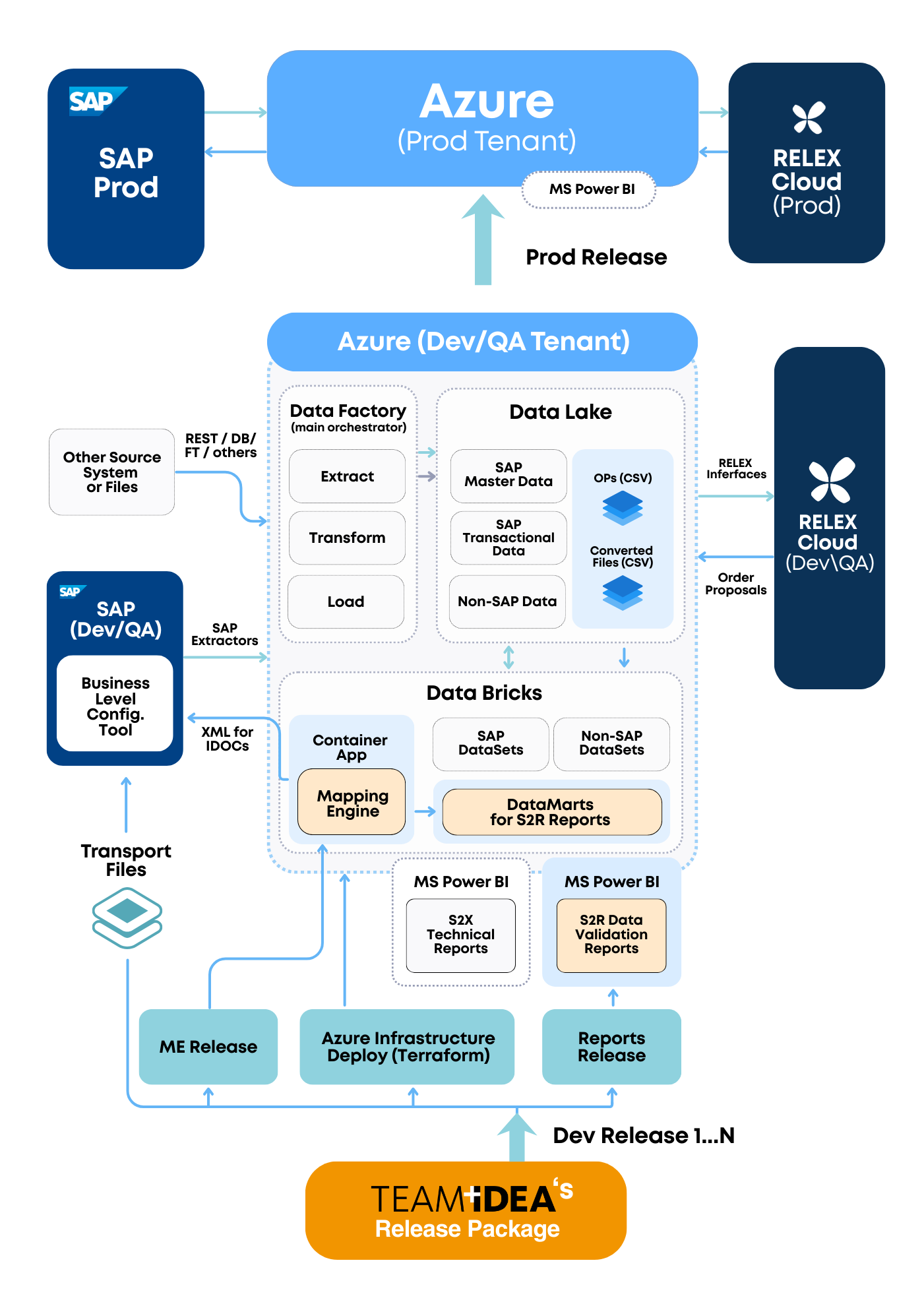
Outbound FlowSAP → RELEX
Inbound FlowRELEX → SAP
DataMart
Serves as an intermediate structured data layer enabling efficient Power BI connectivity and reporting within the prepared aggregated data in CSV files.MS Power BI
For Data validation Reporting.
Multi-Tier Landscape Support
Follows a DEV → PROD transport model, using Teamidea's Release Registry for controlled deployment of customizable components.When SAP BW is Available
If a company has SAP BW, it's recommended to connect BW to the S2R solution via the Operational Data Layer. This ensures consistent data usage, reduces extractor load, and simplifies historical data handling.
Key Advantages

Consistent data usage
The same raw data from SAP ERP is utilized both for business reporting and for integration with RELEX.
Reduced system load and support effort
Avoids duplicating the use of SAP ERP extractors, minimizing extraction workload, monitoring, and support. The extractors operate without additional intervention or performance impact on the ERP system.
Simplified historical data access
Historical data can be uploaded directly from the datawarehouse level, where it is typically already aggregated and readily available.Note:
The S2R solution is fully adaptable to this SAP BW-based landscape. However, it is originally designed for direct integration with SAP ERP, as described in the SAP to RELEX Integration Solution Architecture Diagram in the previous section.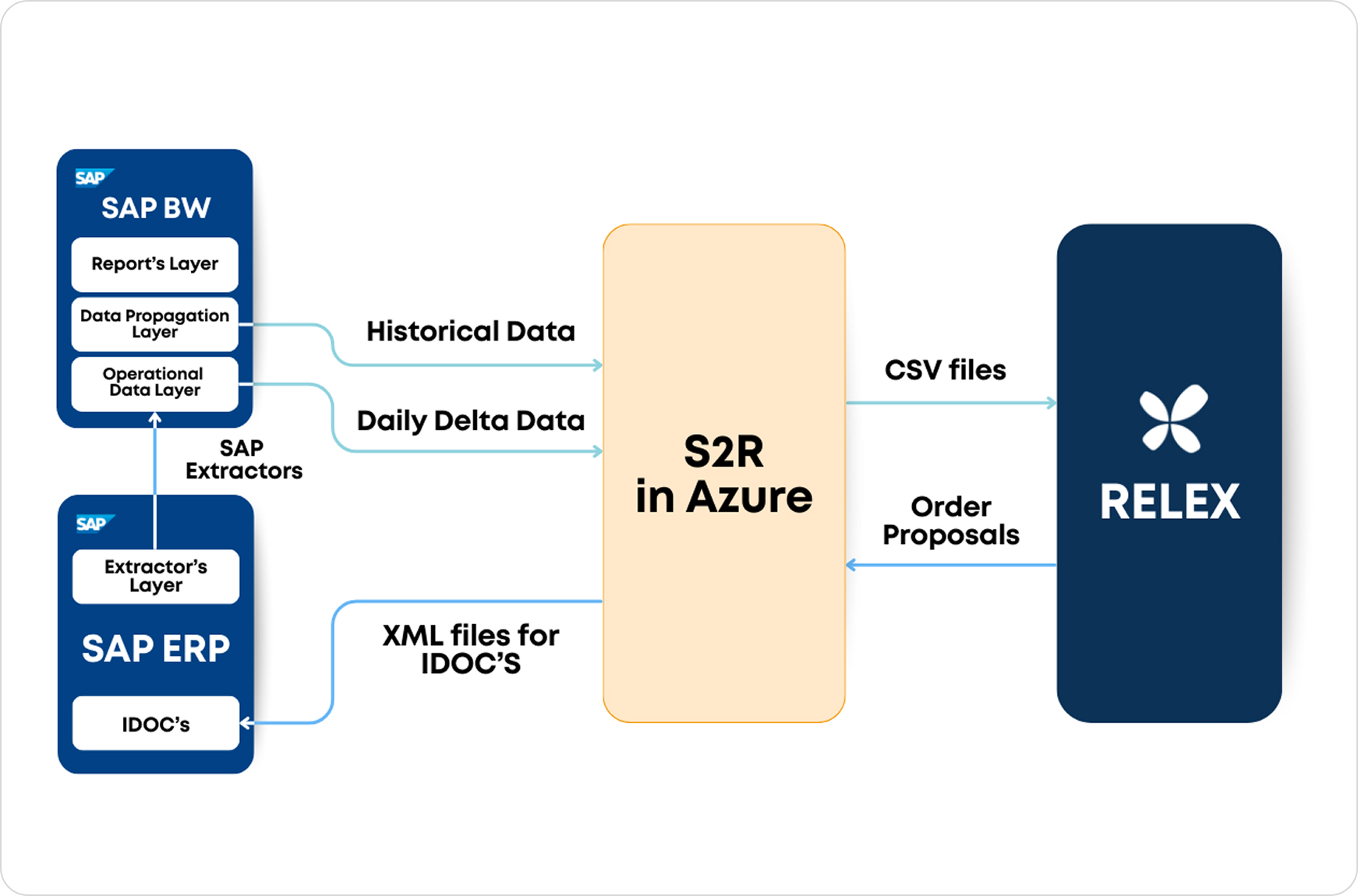
The Business Level Configuration Tool
A flexible and scalable configuration environment in SAP that enables Business users and implementation teams to control and adapt integration behavior without requiring technical development.
Key Functionality
Rollout Capabilities
Phase-by-Phase Expansion
of S2R Configuration
Data Validation Report Kit
Ready-to-use validation DataMarts and Power BI dashboards that support critical data quality checks during S2R integration projects.
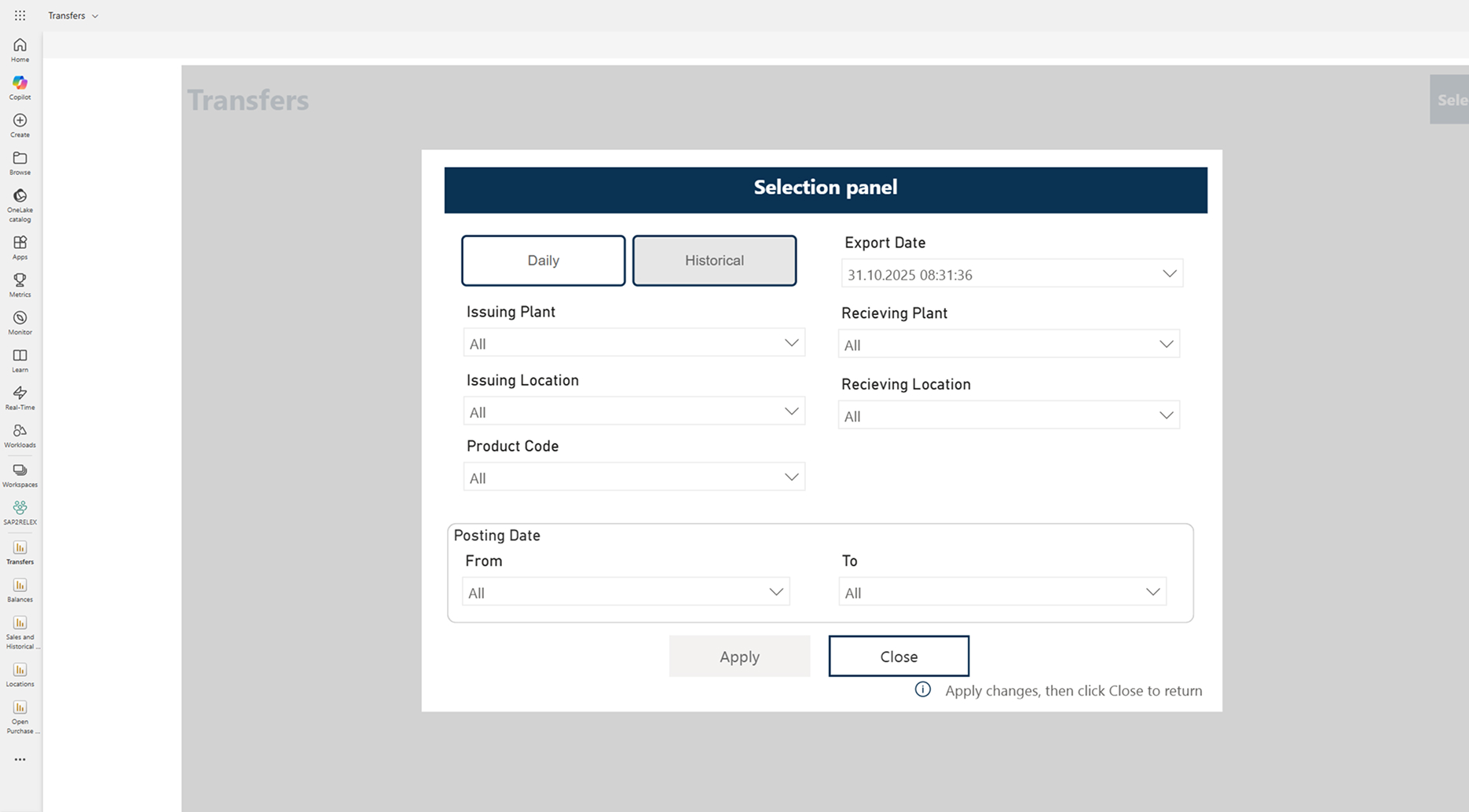
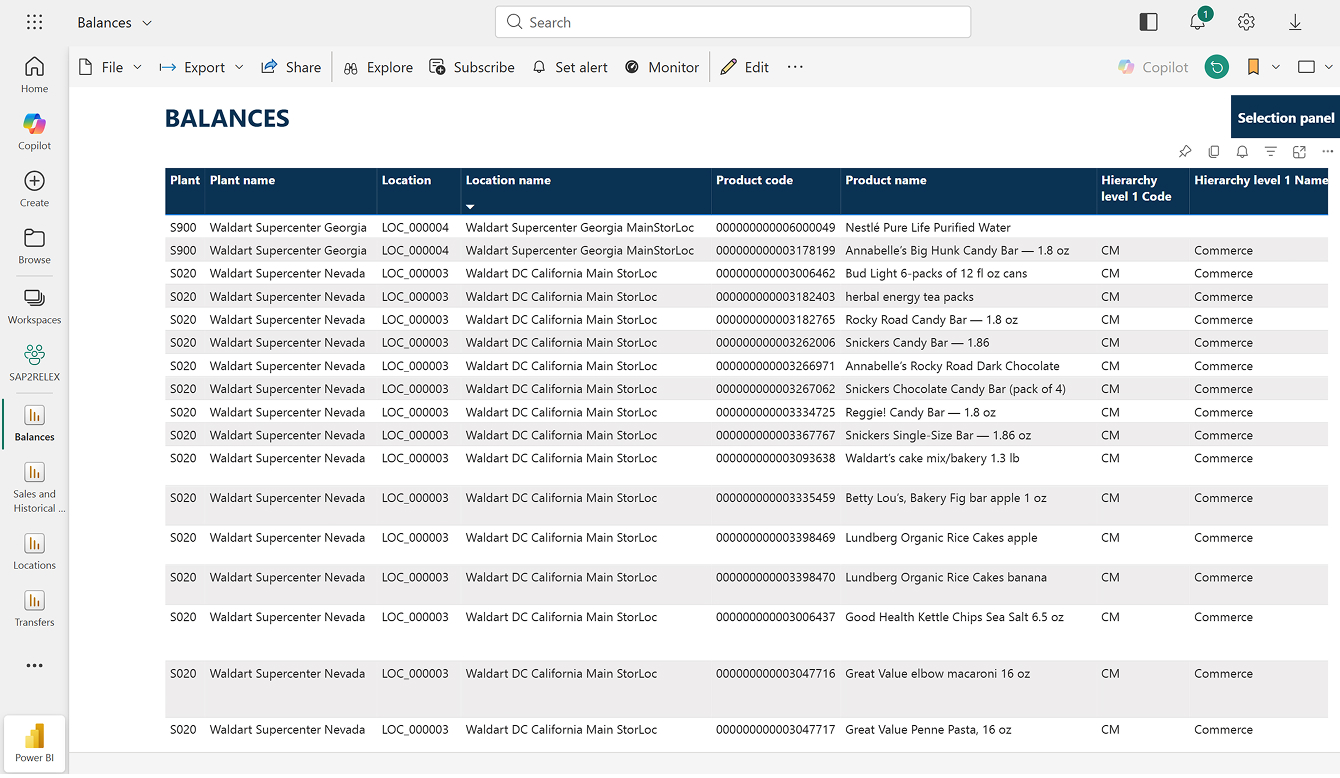
Business-Friendly Data Flow Validation

Structured Validation Methodology

Recommended Solution Implementation Approach
Step-by-step guidance for implementing the solution, defining scope, evaluating assumptions, and coordinating Customer/Vendor activities throughout the S2R project lifecycle.
Interface Scope Definition & S2R Business Assumptions
Understanding requirements and solution boundaries
Scope Definition
A dedicated step included in the Project Preparation Phase to facilitate preliminary evaluation of potential Change Requests and confirm the applicability of the S2R Solution to business scenarios.
Business Assumptions
The Vendor provides the S2R Business Assumptions document, describing for each interface which SAP business processes are considered and how interfaces can be configured.
Key Benefits of Structured Approach


S2R Installation, Activation and Evolution
A structured, transparent, vendor-supported process ensuring predictable project execution.
 Variable Timeline
 No Cost
~3 Days
Fixed Cost
Variable Timeline
Fixed Cost
Variable Timeline
Variable Cost
No Cost
~3 Days
Fixed Cost
Variable Timeline
Fixed Cost
Variable Timeline
Variable Cost
 CR
~3 Days
Fixed Cost
Variable Timeline
Fixed Cost
Variable Timeline
Variable Cost
CR
Variable Timeline
No Cost
Variable Timeline
No Cost
Standard SLA Timeline
No Cost
Standard
Subscription
CR
~3 Days
Fixed Cost
Variable Timeline
Fixed Cost
Variable Timeline
Variable Cost
CR
Variable Timeline
No Cost
Variable Timeline
No Cost
Standard SLA Timeline
No Cost
Standard
Subscription
 Premium
Supported SAP System Versions
Compatibility overview for SAP source systems supported by the S2R integration solution.
SAP ERP (ECC / S/4HANA)
5 versionsSAP ECC
ECC 6.0 (NetWeaver ≥ 7.0 SP17 and < 7.4 SP02)Need to implement SAP Note 2232584 (enable ODP)
AnyDB
Yes (CDS-extractors)
SAP ECC
ECC 6.0 (NetWeaver ≥ 7.4 SP02)Natively
AnyDB
Yes (CDS-extractors)
SAP ECC
ECC 6.0 (NetWeaver ≥ 7.0 SP17 and < 7.4 SP02) → HANANeed to implement SAP Note 2232584 (enable ODP)
HANA
SAP ECC
ECC 6.0 (NetWeaver ≥ 7.4 SP02) → HANANatively
HANA
SAP S/4HANA
All versionsNatively
HANA
SAP BW / BW on HANA
4 versionsSAP BW
<7.3Not supported by ODP
AnyDB
Yes (all extractors)
SAP BW
≥ 7.3 SP08Not Required (OpenHub/TABLE connection)
AnyDB
Yes (all extractors)
SAP BW
≥ 7.4 SP05Not Required (OpenHub/HANA/TABLE connection)
HANA
Yes (all extractors)
SAP BW/4HANA
All versionsNot Required (SAP HANA connection)
HANA
Yes (all extractors)
SAP POSDM
2 versionsSAP POSDM
NetWeaver ≥ 7.0Limited (via ODP-enabled Data Sources)
AnyDB
Yes (all extractors)
SAP POSDM
no ODPNot supported by ODP
AnyDB
Yes (all extractors)
SAP CAR
1 versionsSAP CAR
≥ 2.0Natively (ODP extractors)
HANA
Support Model
Select Support Tier

Premium Support
Full vendor assistance for maintaining and updating the solution
Standard Support
For teams with expertise in SAP and Azure infrastructurePremium Support
SLA OverviewStandard Support
SLA OverviewImportant Note
In certain cases, changes made by the customer's internal team to SAP extractors (e.g., adjustments for internal data warehouse needs) may fall outside the vendor's direct responsibility.Pricing Model
S2R Core License Fee
Annual subscription fee for the core integration
solution.
Support Tier
Premium Support:
Full vendor assistance for maintaining and updating the solution within your infrastructure, including proactive monitoring and priority response times.Standard Support:
Vendor updates only; customer handles infrastructure & monitoring$19 500
Annual fee+ $6 000
Premium upliftSolution Installation
One-time installation of the core S2R components by the vendor, including initial setup, validation, and configuration of base flows.
$5 600
One-Time FeeWhat's Included
 Initial infrastructure setup
Core mapping engine deployment
Initial infrastructure setup
Core mapping engine deployment
 0 consultant hours (billed separately)
Interfaces Activation
Activation package including required flows and consultant hours.
$10 640
One-Time FeeWhat's Included
10 integration flows
40 consultant hours
10 Validation Reports
CR (Interface customization or Custom interface creation)
Custom development or interface modifications billed on a time & materials basis. Perfect for unique integration scenarios and specialized requirements.
What's Included
1 integration flows
Custom integrations & modifications
$90
per hourAdditional Interface (+ validation report)
What's Included
1 integration flow
4 Consultant's Hours
$1 120
one-time feeSubscription Cancellation & Renewal Policy
The solution is provided under a subscription-based license, which does not automatically renew.
Renewal Timeline

- 2 Months
Renewal notice sentMonthly
3 reminder notificationsMonth
Termination notice (if no response)Important Note
Cancellation only affects the Mapping Engine. All infrastructure components (Azure setup, RELEX folders, data pipelines) remain accessible, ensuring continued availability of custom Add-On components.S2R Solution Documentation
The standard solution documentation package includes the following main documents:

Solution Installation Guide
Describes the technical requirements that must be fulfilled by the customer prior to submitting a solution installation request. It also provides a detailed step-by-step overview of the vendor's technical activities during the installation process.
Business and Technical Assumptions
For each data flow (interface), this document outlines the relevant business assumptions based on standard SAP functionality, available parameterization options, and technical assumptions related to SAP standard tables, CDS views, and other components.
Data Validation Methodology
Defines a recommended approach for validating each data flow using SAP standard transaction codes and dedicated Power BI reports.
Technical Design and Operations
Provides a comprehensive description of all key solution components — SAP, Azure, RELEX ABS, the Mapping Engine, Report Set, and more. It also outlines the standard release model and details for both Standard and Premium support models.