112
10 min
SAP S/4HANA Business Partner Conversion: How to Handle Legacy Customer/Vendor Links in BD001 and BC001

Ksenia Razumovskaya
Business Development Manager, TeamIdea Group
This article explains how to identify legacy mappings, analyze inconsistencies, migrate the links, and ensure the system meets S/4HANA readiness checks. Experts at TeamIdea support and accompany you with this straightforward and easy-to-follow visual guidance material. It will lead you through every stage of the SAP S/4HANA Business Partner Conversion, ensuring each step is completed correctly and consistently.


Old relationships remain in BD001/BC001, while new Customers/Vendors are written only to the new CVI tables. SAP intentionally did not migrate old entries due to design decisions at the time. SAP S/4HANA conversion tools (especially SUM) validate only CVI_CUST_LINK and CVI_VEND_LINK and ignore BD001/BC001.
This creates a situation where: the business partner technically exists, legacy links exist in BD001/BC001, but the new tables appear empty, causing SUM to block the migration.

However:
CVI_COMPL_CHK lists the Customer as not fully converted. Although an assigned Business Partner exists:
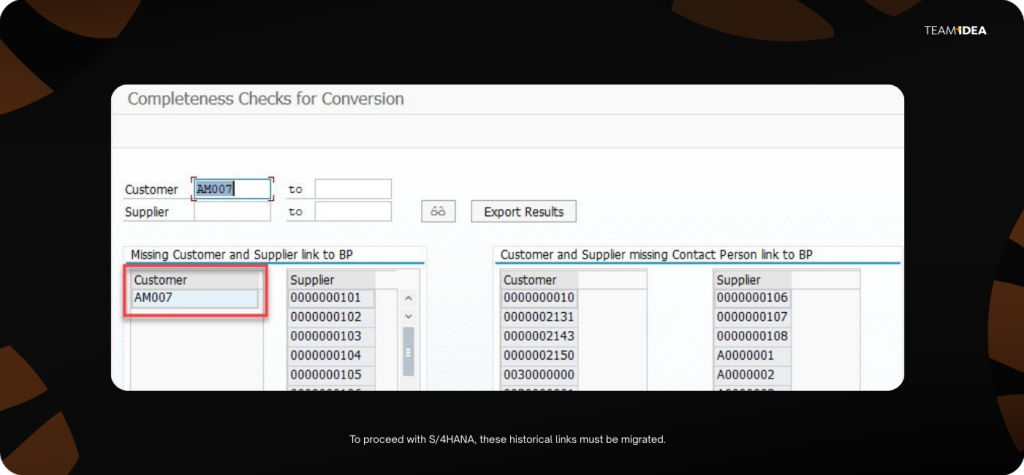
CVI_LINKS shows a BP relationship, but with a remark: “Mapping stored in BD001.” CVI_CUST_LINK has no entry. To proceed with S/4HANA, these historical links must be migrated.


Phase 1: Consistency Checks
Identify and remove incorrect or obsolete BD001/BC001 entries. To accomplish this, please To find and follow instructions of SAP note:
1105558 - BP_CVI: Migration report from Note 851445 terminates.
Typical inconsistencies include:
These issues must be corrected manually in SE16/SE16N before proceeding.

Phase 2: Migration Steps
Convert legacy table entries to the new CVI link tables and synchronize tax data.

Both phases use SAP-delivered reports that must be executed in a strict sequence.
Below is the required sequence of reports, along the mind map

Step 1 — Analyze Customer Tax Numbers
CVI_ANALYZE_CUST_TAX_NUMBERS
Step 2 — Analyze Vendor Tax Numbers
CVI_ANALYZE_VEND_TAX_NUMBERS
Performs the same analysis for Vendors.
Step 3 — Synchronize Customer Tax Numbers
CVI_SYNC_CUST_TAX_NUMBERS

Step 4 — Synchronize Vendor Tax Numbers
CVI_SYNC_VEND_TAX_NUMBERS
Identical approach as for Customers.

Step 5 — Migrate Customer Links from BD001
CVI_MIGRATE_CUST_LINKS

Example result: Customer AM007 → BP AM007 entry now appears in CVI_CUST_LINK.

Step 6 — (Optional) Migrate Vendor Links from BC001
CVI_MIGRATE_VEND_LINKS
BC001 → CVI_VEND_LINK migration.
Optional because the system continues reading BC001 for fallback, but recommended for performance and S/4HANA readiness.

Step 7 — Adjust Role Customizing
CVI_ADJUST_ROLE_CUSTOMIZING

This report:
We recommend:
Running the report without deletion first (test mode) and executing it again with deletion once transport routes are confirmed
Validation and Cleanup

Once moved into CVI_CUST_LINK and CVI_VEND_LINK, the system passes SUM validation and is ready for S/4HANA conversion.

Please, refer to more SAP notes and do not hesitate to ask your TeamIdea colleagues:
The Essentials of the Conversion
Before moving an SAP ECC system to SAP S/4HANA, every Customer, Vendor, and Contact Person must be transformed into a Business Partner (BP). This prerequisite step — Customer-Vendor Integration (CVI) Conversion — is often challenging when historical Customer/Vendor relationships are still stored in legacy tables BD001 and BC001. These tables were used in early ECC releases to map a Customer or Vendor to a Business Partner. Beginning with ECC 6.0, SAP introduced a redesigned CVI framework with new link tables (CVI_CUST_LINK and CVI_VEND_LINK). However, old mappings are not automatically transferred to the new structure. This mismatch leads to CVI inconsistencies and, ultimately, prevents the system from being converted to S/4HANA.Background: Why BD001 and BC001 Still Matter
In ECC 5.0 and below, Customer–BP assignments were stored in BD001, and Vendor–BP assignments in BC001. From ECC 6.0 onward, SAP delivered a redesigned CVI model with: CVI_CUST_LINK, CVI_VEND_LINKOld relationships remain in BD001/BC001, while new Customers/Vendors are written only to the new CVI tables. SAP intentionally did not migrate old entries due to design decisions at the time. SAP S/4HANA conversion tools (especially SUM) validate only CVI_CUST_LINK and CVI_VEND_LINK and ignore BD001/BC001.
This creates a situation where: the business partner technically exists, legacy links exist in BD001/BC001, but the new tables appear empty, causing SUM to block the migration.
Typical Scenario
However:
CVI_COMPL_CHK lists the Customer as not fully converted. Although an assigned Business Partner exists:
CVI_LINKS shows a BP relationship, but with a remark: “Mapping stored in BD001.” CVI_CUST_LINK has no entry. To proceed with S/4HANA, these historical links must be migrated.
Overall Conversion Approach
To avoid this, the process consists of two main phases:Phase 1: Consistency Checks
Identify and remove incorrect or obsolete BD001/BC001 entries. To accomplish this, please To find and follow instructions of SAP note:
1105558 - BP_CVI: Migration report from Note 851445 terminates.
Typical inconsistencies include:
- Missing BPs for existing Customers/Vendors
- Missing Customers/Vendors for existing BP links
- Multiple BPs assigned to a single Customer or Vendor
These issues must be corrected manually in SE16/SE16N before proceeding.
Phase 2: Migration Steps
Convert legacy table entries to the new CVI link tables and synchronize tax data.
Both phases use SAP-delivered reports that must be executed in a strict sequence.
Below is the required sequence of reports, along the mind map
Step 1 — Analyze Customer Tax Numbers
CVI_ANALYZE_CUST_TAX_NUMBERS
- Checks mismatches between Customer tax data and BP tax data.
- Must be executed before any synchronization or link migration.
- View results in SLGD application log.
Step 2 — Analyze Vendor Tax Numbers
CVI_ANALYZE_VEND_TAX_NUMBERS
Performs the same analysis for Vendors.
Step 3 — Synchronize Customer Tax Numbers
CVI_SYNC_CUST_TAX_NUMBERS
- Aligns tax data between Customer and BP.
- Direction can be chosen depending on which object is considered leading.
- “Automatically switch direction” option ensures that the object without tax details is updated.
Step 4 — Synchronize Vendor Tax Numbers
CVI_SYNC_VEND_TAX_NUMBERS
Identical approach as for Customers.
Step 5 — Migrate Customer Links from BD001
CVI_MIGRATE_CUST_LINKS
- Transfers BD001 entries → CVI_CUST_LINK
- BD001 can be cleared afterward
- Must be executed only after completing tax data analysis and synchronization.
Example result: Customer AM007 → BP AM007 entry now appears in CVI_CUST_LINK.
Step 6 — (Optional) Migrate Vendor Links from BC001
CVI_MIGRATE_VEND_LINKS
BC001 → CVI_VEND_LINK migration.
Optional because the system continues reading BC001 for fallback, but recommended for performance and S/4HANA readiness.
Step 7 — Adjust Role Customizing
CVI_ADJUST_ROLE_CUSTOMIZING
This report:
- Moves old BP role applications (FLCU, FICU, LOCU) to the new CVIC application
- Updates datasets
- Maps field groups to their new equivalents
- Optionally deletes obsolete configuration.
We recommend:
Running the report without deletion first (test mode) and executing it again with deletion once transport routes are confirmed
Validation and Cleanup
- Conversion Completeness.
- Link Verification
- Cleanup
Conclusion
Migrating historical Customer/Vendor–BP mappings is a mandatory part of preparing ECC for S/4HANA. Legacy BD001 and BC001 entries must be:- Analyzed
- Cleaned
- Synchronized
- Migrated
Once moved into CVI_CUST_LINK and CVI_VEND_LINK, the system passes SUM validation and is ready for S/4HANA conversion.
Please, refer to more SAP notes and do not hesitate to ask your TeamIdea colleagues:
2601760 - What's the difference for the entries in BD001/BC001 and CVI_CUST_LINK/CVI_VEND_LINK?
851445 - BP_CVI: Details about reports to be executed for ERP 2005